Over the past few weeks, there has been a noticeable increase in phishing emails reaching business inboxes. This is not a passing spike. It reflects a steady trend that has been building for years, now made worse by better tools on the attacker’s side and more reliance on email in day-to-day business. Our hope is the help small business to recognize and prevent phishing attacks by utilizing email security best practices.
Phishing is no longer limited to poorly written emails from unknown senders. The messages we are seeing today are more convincing, more targeted, and often tied to real business processes such as invoices, document sharing, and account security alerts.
According to industry reporting from organizations like Cybersecurity and Infrastructure Security Agency and Verizon, phishing remains one of the most common entry points for data breaches. That aligns with what we see in the field. In fact, statistics show that 85 percent of Microsoft 365 users have encountered phishing attempts, with a meaningful number resulting in compromised accounts .
Why Phishing Is Increasing Right Now
There are a few practical reasons behind the recent surge.
First, attackers have better tools. AI-assisted writing allows them to craft messages that read naturally, with fewer spelling errors and more believable tone.
Second, many businesses rely heavily on cloud platforms like Microsoft 365. That creates a consistent target. Attackers know what login pages look like and can mimic them closely.
Third, people are busy. Phishing works best when someone is distracted, rushing, or trying to be helpful.
Finally, attackers are shifting toward smaller organizations. These businesses often lack layered security and formal training, making them easier targets. This matches what we see in broader trends, where small and mid-sized businesses are now a primary focus for cyberattacks .
Real-World Phishing Attack Prevention and Examples
Below are examples of messages we have seen recently. These vary from poorly written and designed phish attempts to convincing and intricate, but they reflect the same structure and intent. We have included some email security best practices to avoid falling prey to these attacks.
Note: These messages were opened reviewed and studied on a Sandboxed Virtual Machine. We do not advise researching malicious email on a machine that you do not plan to trash afterwards.
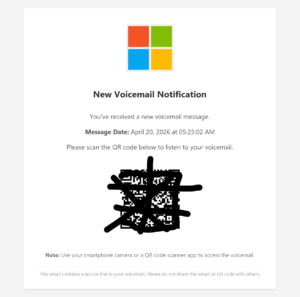
1. New Voicemail Email
In this instance the user received a message indicating that they had a new Voicemail with a request to scan a QR code to listen. Too many people view QR codes as innocuous. However in my mind they are much more dangerous than a link. With a link the recipient at least has the ability to hover over the link and view the destination. With a QR code the average user will not go through the hassle to check the destination before scanning the code.
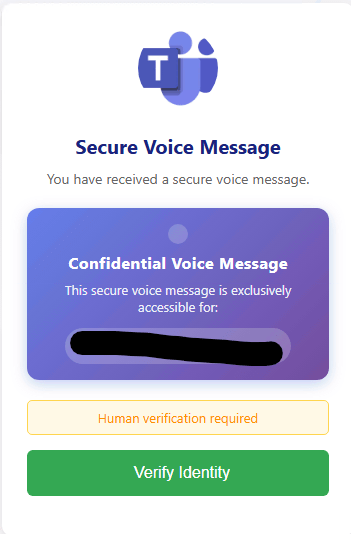
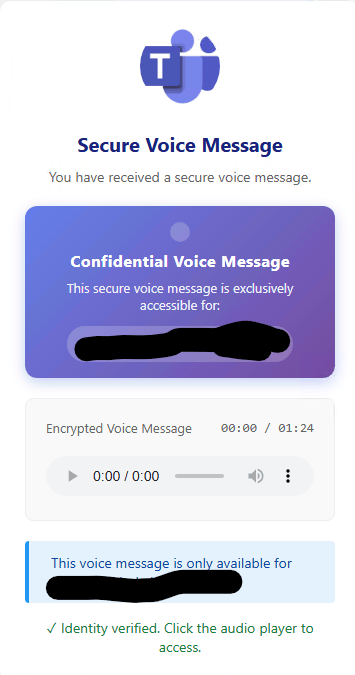
In this case the QR code directs to a mocked up Microsoft Teams Screen. Note that the domain is not Microsoft.
After clicking ‘Verify Identity’ an ‘Encrypted Voice Message’ is displayed.
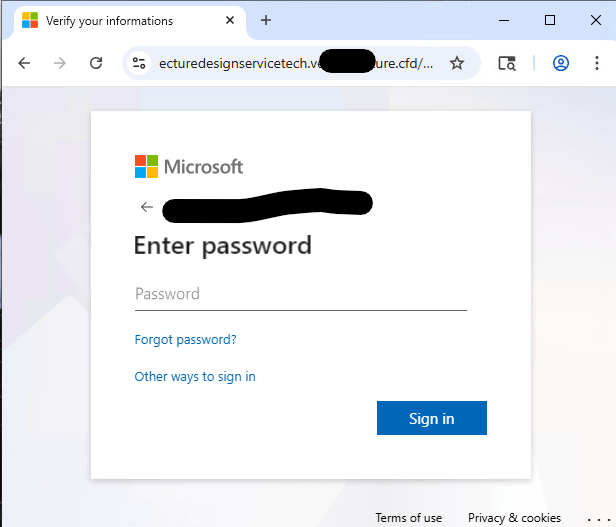
If you click on the message. You are greeted with a fake MS Teams Splash screen, then another malicious Windows Credentials Entry page. Note that the URL is not Microsoft!
A couple of items worthy of note: 1. Neither the ‘Forgot password?’ or ‘Other ways to sign in’ are functioning links. 2. THE URL IN THE ADDRESS BAR IS NOT MICROSOFT.COM!!! – Always pay attention to this!
If you were to enter your credentials and click sign in. The web page simply returns a message stating that ‘your account or password is incorrect’ with no further options.
To prevent the success of this phishing attack you should always be cognizent of the URL when entering credentials.
2. Password Reset Request
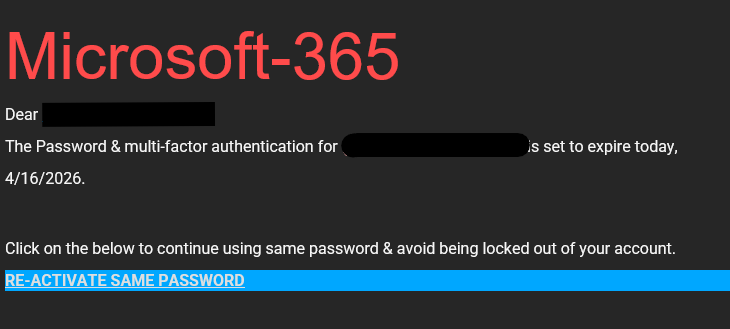
In the example above there are indications that it is not legitimate before clicking anything. 1. The mail format does not look professional. 2. The color scheme, fonts, and layout do not match Microsoft’s typical communication. 3. If you hover over the link you see that it points to a ‘maps.google.it’ address and not to Microsoft.
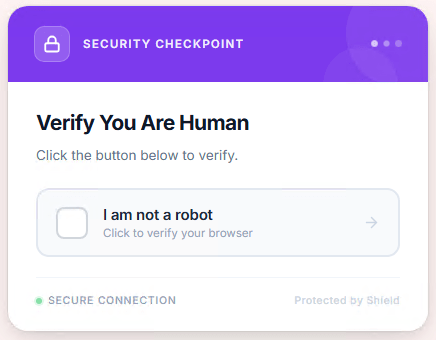
After Clicking the link it forwards you to another domain ‘microsoftsecure.——liances.com’ Here you are greeted with a fake Captcha dialog.
After completed the Captcha you are redirected to a near perfect Microsoft Online sign in dialog. The goal is to get you to enter your credentials so that they can then capture, store, and likely sell them.
While this phishing technique started with an entirely different narrative, it ends the exact same way as the previous voice mail attack.
3. Shared Document Notification
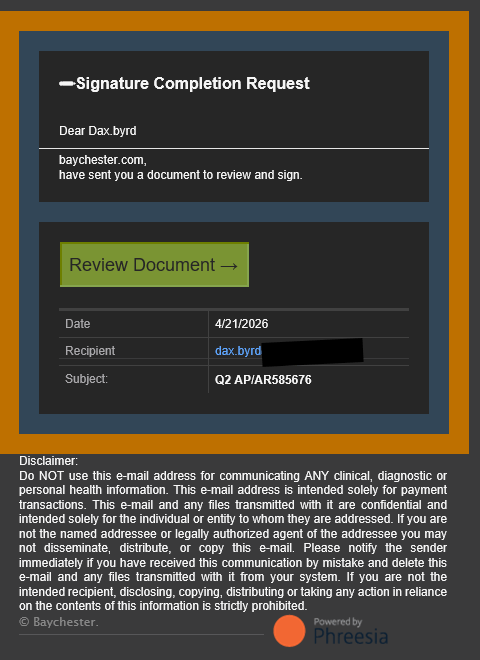
This phish was sent directly to me. It should be noted that Phreesia is a company that we work with regularly and it would not be odd to receive a secured document from them.
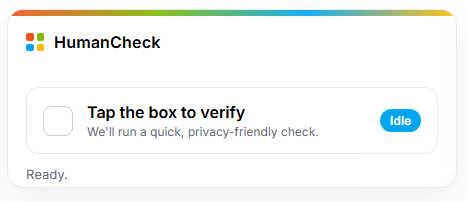
This message like the previous contains a link that does not point to Phreesia’s website. After Clicking the link you are redirected to another fake Captcha dialog.
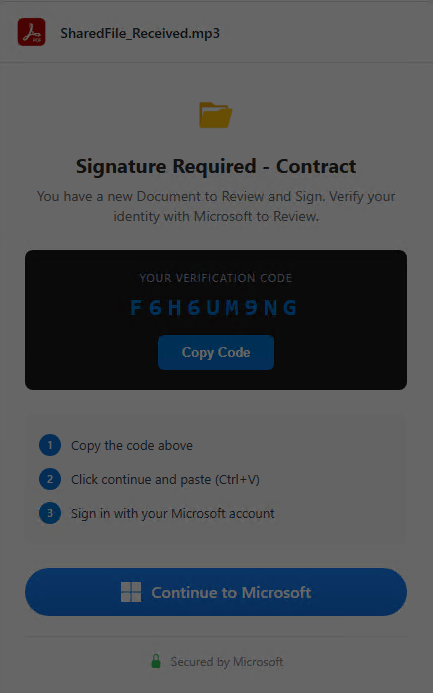
After ‘processing’ the fake Captcha you are redirected to a screen that indicates a requirement to sign into Office 365 to sign the document.
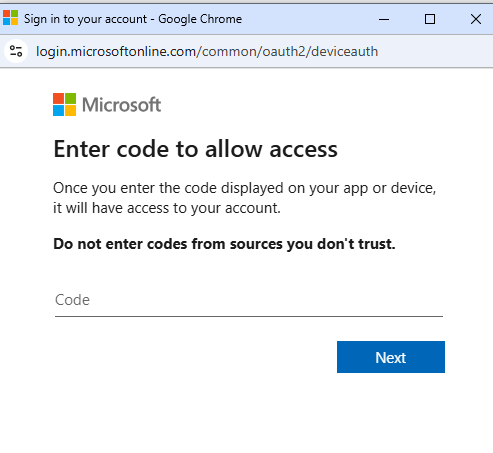
You are then redirected to a ‘real deal’ Microsoft page asking you to enter a code to allow access. If you enter the verification code from the previous screen and are credentialed in Office 365. Microsoft will then issue OAuth tokens to the malicious party. These tokens can be used to compromise or even take over your Microsoft Tenant. The higher privilege level granted to the user, the higher the potential damage.
This one is scary because you are actually entering data in a legitimate Microsoft Credential Request form. We experienced a breach a few years ago using this method as the attack vector. This type of breach can create a real mess as there is potential for a full tenant take over. Depending on the permissions granted there can be artifacts and backdoors scattered throughout your tenant.
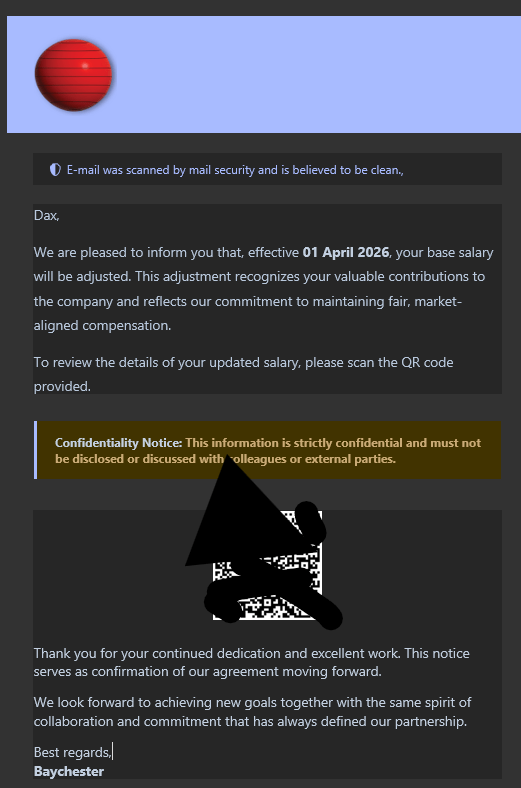
4. HR Email Phishing Attack Prevention
I received this message last week. The address referenced in the QR code has since been taken offline, so I cannot step through the entire phish. However, it was very similar to the previous methods.
This type of message usually will seem to come from Human Resources or possibly a trusted person within your company. It was obvious to me that it was a phish as I sign the checks, but it would be very easy for a line level employee in a larger corporation to see this as a legitimate message from payroll or HR.
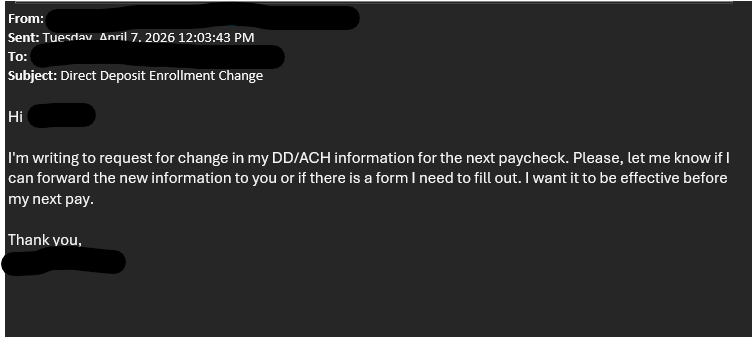
5. Social Engineering
In this case an email was received (seemingly from a current employee) by a manager. The employee is requesting a change be made to their direct deposit account. Had the manager responded the malicious actor would have attempted to have the payroll changed to route to their own routing and account number.
Unfortunately we have seen much higher success rates by the malicious actors using this type of attack.
We generally see it in two different flavors. 1. Internal – An ’employee’ makes a request to a manager. 2. External – A ‘vendor’ makes a request to a purchasing agent or AP Clerk/Manager.
Often when we see External phishes, we have found that one of the two mailboxes (sender or recipient) has been breached. Often the malicious actor will breach the account and monitor messages until they see an opportunity. Example…. A vendors mailbox has been breached. The bad actor will monitor the mailbox for outbound invoices. They see invoice number 12345 in the amount of $10,000 sent from the breached mail box. They will then do a couple of things…
1. Create an Outlook rule that will move any messages from the recipient to an obscure folder. 2. Send a supplementary email from the vendors mailbox to the purchaser stating something to the effect-“We are in the process of migrating our incoming receivables to a new account. Can you change the routing information for invoice 12345 to routing number xxxxxxxx and account yyyyyyyyyy. 3. They will monitor the ‘obscure’ folder for any response from the recipient and then reply as if they are the vendor.
Always follow up with a meeting or phone call when routing or financial changes are requested. This should be policy for all businesses.
5. Internal Spoofed Email
Most of the messages above were sent using a type of spoofing.
Spoofing is a deceptive technique where an attacker pretends to be a trusted person, device, or system in order to trick someone or something into trusting them.
In cybersecurity, spoofing typically means forging identifying information such as an email address, phone number, IP address, or website, so the attacker appears legitimate and reliable. The goal is usually to steal information, money, credentials, or to gain unauthorized access to systems.
Common Traits to Watch For
Even with improved quality, phishing emails tend to share certain characteristics.
A sense of urgency or pressure
Requests involving money, credentials, or sensitive data
Links that lead to login pages
Slight variations in domain names or email addresses
Unexpected attachments
At first glance, phishing does not always look suspicious, making awareness matter more than ever.
Preventing Phishing Attacks- How to Stay Vigilant
Staying safe does not require deep technical knowledge. It comes down to consistent habits and strict adherence to email security best practices.
Slow Down
Most phishing attempts rely on speed. So you should take a moment before clicking anything. If an email feels urgent, that is often a sign to pause.
Verify Requests
If someone asks for money, login credentials, or unusual actions, confirm it through another method. Call the person! This is one of the methods of preventing a successful phishing attack.
Inspect Links Carefully
Hover over links before clicking. Look for subtle changes in domain names. A fake site may look identical but use a slightly altered URL.
Use Multi-Factor Authentication to Prevent Successful Phishing Attacks
Even if credentials are stolen, MFA can prevent access. This is one of the most effective safeguards available today.
Keep Systems Updated
Security updates close known vulnerabilities. While phishing targets users, attackers often combine it with outdated systems to gain deeper access.
Train Your Team
Employees are the first line of defense. Regular reminders and simple training can make a significant difference.
Why Technical Protection Still Matters
User awareness is critical, but it is not enough on its own. Phishing emails are designed to bypass human judgment.
That is where layered security comes in.
Modern endpoint protection can identify malicious links and behavior before damage occurs.
Email filtering, DNS protection, and monitoring also play a role. These tools reduce the number of dangerous messages that ever reach an inbox.
If your business is relying on default settings, it is worth reviewing your configuration. Many organizations assume their platform handles security out of the box, which is often not the case.
Preventing phishing attacks may not be possible but strengthening your security posture can asuage potential damage.
Phishing Attack Prevention – The Cost of Getting It Wrong
Phishing is not just an inconvenience. It is often the first step in a larger attack.
A single compromised account can lead to:
Unauthorized access to email and files
Fraudulent payments or invoice manipulation
Data exposure
Ransomware deployment
These events carry real financial and operational consequences. They also impact trust, which is harder to measure but just as important.
Final Thoughts
The recent surge in phishing emails is not an isolated event. It reflects a shift in how attacks are carried out. They are quieter, more targeted, and harder to detect at a glance.
While preventing phishing attacks is currently impossible. The good news is that the solution is not complicated. Awareness, combined with proper security measures, and adherence to email security best practices goes a long way.
Take the time to review how your team handles email. Look at your current protections. Small changes made now can prevent major problems later.
Let us prepare your business for continuity now! contact Baychester Associates.
UniFi Network 10.4 is more than a routine software update. For businesses that rely on Ubiquiti UniFi infrastructure, this release brings meaningful improvements in routing, remote connectivity, network visibility, resiliency, and multi-site management. That matters because today’s business network is not just “the internet.” It supports cloud applications, phones, WiFi,
Over the past few weeks, there has been a noticeable increase in phishing emails reaching business inboxes. This is not a passing spike. It reflects a steady trend that has been building for years, now made worse by better tools on the attacker’s side and more reliance on email in